Reveal
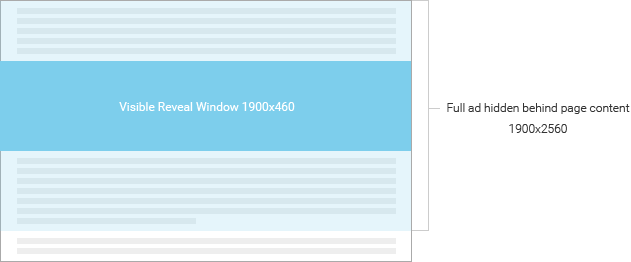
As the user scrolls down the page and approaches the Reveal unit, the visible window of the Reveal unit scrolls up with the page content and reveals the ad that is hidden in the background. The ad is static behind the page content and does not move. As the user continues to scroll, the Reveal window shows only a portion of the ad at a time, panning smoothly from bottom to top. As the user scrolls back up the page, the Reveal window moves down in a reverse effect with the page content.
| Dimensions | 1900x460 |
|---|---|
| Full Ad Dimensions | 1900x2560 |
| Ad Type | HTML5 |
| Format | In-Banner |
| File Size | 150 KB |
| Animation Limit | N/A - The ad itself must be static. The only animation will be the revealing of the static ad. |
| Notes | We recommend keeping the most important elements within a 1900x460 space toward the middle of the ad, and using the remaining ad space for secondary images and/or copy. This will ensure a focus point as the user scrolls down the page. The unit will be responsive, so the visible reveal window area and ad itself will resize according to the user’s browser size and resolution. |
If a template is available for this unit, the download link will be located next to the example link. Please refer to the Template Guide for details on how to use our Ad Builder templates.
If the creative will be built and produced by Interpolls (Managed Services), below are a list of deliverables to submit to your Interpolls Account Manager. For more details, refer to Creative Submission.
- Client approval on final creative
- Layered PSD(s) of creative
- Static flattened JPG of the creative
- All fonts used in the creative
- Backup JPG created at the same dimensions as the unit itself. The dimensions of the unit may be referenced in the Specifications section above. The backup JPG is a static image that will be displayed for browsers or platforms that do not support HTML5.